Why I wrote this guide
System design is often taught as a list of boxes. Add a load balancer, put Redis in front of a database, add Kafka, split the data, and call the result scalable. But that is not a good place to start.
A good design starts with three questions. What must the system do? How much work must it handle? What should happen when something fails? Choose the technology after you answer them. PostgreSQL and a queue may be enough at one scale. A larger system may need data split across servers and regions. The important skill is not memorizing one architecture. It is learning how to make choices from real requirements.
This guide covers ideas that appear again and again in production systems. Each section explains one idea, the main tradeoff, a simple example, and where to learn more.
You can use it in three ways:
- As a first pass through system design. Read it end to end and learn the vocabulary.
- As a design checklist. Use the later worksheet when reviewing an architecture.
- As a study map. Follow the references when a concept becomes important to your work.
The examples are illustrative. Product names are not endorsements, and there is rarely one correct tool for a problem.
The main idea is simple: make the important tradeoffs before production makes them for you.
1. System design is not drawing boxes
The diagram is the output of reasoning, not the reasoning itself.
When you design a system, six questions matter more than the specific boxes you choose:
- What must the user be able to do?
- What load and growth must the system handle?
- What guarantees must the system provide?
- What can fail, and what happens when it does?
- How will operators know the system is healthy?
- What does the design cost to build and run?
A useful design process therefore looks like this:

A system design reasoning loop that moves from requirements to workload, architecture, failure modeling, operability, cost, and then back to revised requirements.
The loop matters because architecture is not static. Measurements change assumptions. A cache hit rate is lower than expected. One tenant creates a hot partition. A database failover takes longer than the product can tolerate. A retry policy turns a small dependency failure into an overload event. Good systems evolve because their designers keep measuring and revisiting the model.
Ten principles worth remembering
- Start with the user-visible guarantee. “99.9% availability” is less useful than “checkout must complete even when recommendations are unavailable.”
- Design for the common path, but model the failure path. Production pain usually comes from the second one.
- Scale the bottleneck, not the diagram. Adding components that are not constrained adds complexity without capacity.
- Every synchronous dependency spends latency and availability budget. Five “three-nines” dependencies in series do not magically create a three-nines request path.
- Data semantics drive architecture. A payment ledger and a social like counter have different consistency requirements.
- Queues absorb bursts; they do not create capacity. A growing queue is deferred overload.
- Retries are additional load. They need deadlines, limits, backoff, jitter, and duplicate-safe operations.
- The partition key is an architectural decision. It determines locality, hotspots, scaling, and often the future migration cost.
- Observability must be designed with the system. You cannot debug a distributed request path using only host CPU.
- Prefer the simplest architecture that meets the requirements. Distributed systems charge interest on every extra moving part.
2. Start with requirements, not technology
A design becomes tractable when vague goals become explicit constraints.
2.1 Functional requirements
Functional requirements describe what the system does.
For a URL shortener, they may be:
- Create a short URL for a long URL.
- Redirect a short code to the original URL.
- Optionally support custom aliases and expiration.
- Record aggregate click analytics.
For a payment service:
- Create a payment intent.
- Authorize or capture funds.
- Return a stable status for repeated client requests.
- Record an immutable audit trail.
- Notify downstream fulfillment only after the payment reaches the required state.
Do not start by listing every feature. Identify the flows that shape the architecture.
2.2 Non-functional requirements
These are usually more important to the design:
- Availability: What percentage of valid requests should succeed?
- Latency: What p50, p95, and p99 response times matter?
- Durability: What data loss is acceptable?
- Consistency: How fresh or ordered must reads be?
- Throughput: What steady-state and peak load must be sustained?
- Scalability: How fast may load grow?
- Recovery: What RTO and RPO are acceptable?
- Security: What identities, permissions, encryption, and audit controls are required?
- Compliance and residency: Where may data be stored and processed?
- Cost: What cost per user, request, GB, or transaction is acceptable?
Availability, durability, and consistency are different
These words are often mixed together.
- A service can be available while returning stale data.
- A storage system can be durable while temporarily unavailable.
- A strongly consistent operation can choose to fail rather than return an uncertain answer.
That distinction matters. A product catalog may prefer availability and slightly stale reads. A bank balance update may prefer a failed request over conflicting writes.
2.3 Make latency concrete
“Fast” is not a requirement. “p99 under 300 ms for product reads at 15,000 requests per second” is.
Percentiles matter because averages hide the users who experience the tail. If one dependency occasionally takes two seconds, the p99 of the complete request path can be dominated by that dependency even when its average looks good.
A useful latency budget might look like:
| Stage | Budget |
|---|---|
| Edge and network | 40 ms |
| Authentication and gateway | 20 ms |
| Application logic | 40 ms |
| Database/cache | 100 ms |
| Serialization and response | 20 ms |
| Safety margin | 80 ms |
| p99 target | 300 ms |
The numbers are workload-specific, but the exercise exposes where the design cannot afford a slow dependency.
2.4 Example: two systems, two different guarantees
Consider a social app and a payment platform.
Social feed:
- A new post can appear a few seconds late.
- A temporary missing like count is tolerable.
- Read availability is very important.
- High fanout and read scale dominate the design.
Payment capture:
- Duplicate charges are unacceptable.
- State transitions must be auditable.
- A timeout cannot mean “blindly try the side effect again.”
- Correctness and idempotency dominate the design.
Both may use APIs, databases, caches, and queues, but the guarantees change how those components are used.
3. Model the workload before choosing the architecture
Capacity planning does not require perfect forecasts. It requires useful orders of magnitude.
3.1 The minimum workload model
Estimate:
- Daily or monthly active users.
- Peak concurrent users.
- Read requests per second.
- Write requests per second.
- Read/write ratio.
- Average and high-percentile payload size.
- Fanout per event.
- Retention period.
- Storage growth per day.
- Burst factor over average traffic.
- Geographic distribution.
The purpose is to locate the likely bottlenecks.
3.2 A simple example
Suppose a photo product has these planning assumptions:
- 10 million daily active users.
- Each user views 100 metadata records per day.
- Each user uploads 2 photos per day.
- Average metadata record: 2 KB.
- Average image: 3 MB.
- Peak traffic: 5x the daily average.
Metadata reads per day:
10M users x 100 = 1B reads/day
Average read QPS:
1B / 86,400 ~= 11,600 reads/sec
Peak planning QPS:
11,600 x 5 ~= 58,000 reads/sec
Image bytes uploaded per day:
10M x 2 x 3 MB = 60 TB/day
This immediately suggests several architectural facts:
- Large image bodies belong in object storage, not the metadata database.
- Metadata reads may benefit from caching.
- Upload bandwidth and object-storage request rates deserve separate capacity models.
- The peak-to-average ratio matters more than the daily average for serving capacity.
These are planning assumptions, not predictions. Record them as such.
3.3 Model concurrency, not only QPS
A service handling 10,000 requests per second with 10 ms service time sees very different concurrency from one with one-second requests.
A useful approximation is Little’s Law:
concurrency ~= arrival rate x average time in system
At 5,000 requests/sec and 200 ms average end-to-end time:
5,000 x 0.2 ~= 1,000 concurrent requests
Concurrency affects connection pools, worker counts, memory, queue size, and downstream pressure.
3.4 Plan for bursts and skew
Uniform traffic is a dangerous assumption.
Real workloads include:
- A celebrity creating a post.
- A flash sale.
- A customer importing millions of records.
- A popular key that receives a disproportionate number of reads.
- A retry storm after a dependency recovers.
- A scheduled job that starts on the hour across thousands of tenants.
Design headroom for both volume and skew.
4. Draw the request path and the data path
A system becomes easier to reason about when you can trace one request through it.

A typical modern request path from client through edge, gateway, application service, cache, database, event log, workers, and specialized storage.
4.1 Separate synchronous and asynchronous work
The synchronous path is what the user waits for. Every dependency on this path consumes latency and availability budget.
For an e-commerce checkout, a naive synchronous path might be:
client -> gateway -> cart -> inventory -> pricing -> payment -> order DB -> email ->
analytics
Email and analytics do not usually belong there. A better path is often:
client -> gateway -> checkout -> inventory/payment/order transaction boundary -> response
Then:
OrderCreated event -> email, analytics, search indexing, recommendations
The design question is not “can this be asynchronous?” It is “does the user-visible guarantee require this work before the response?”
4.2 Mark boundaries explicitly
On a design diagram, identify:
- Trust boundaries.
- Network hops.
- Region or zone boundaries.
- Durable versus in-memory state.
- Queue boundaries.
- Transaction boundaries.
- Control-plane and data-plane components.
These labels often matter more than the component names.
4.3 Control plane versus data plane
Many modern systems separate desired state from request execution.
Examples:
- Kubernetes control plane decides desired workload state; nodes run the workloads.
- A service mesh control plane distributes routing and security configuration; proxies carry traffic.
- An API management plane stores policy; gateways enforce it on requests.
A control-plane outage should ideally not stop an already-configured data plane. Treat that as an explicit design property rather than an assumption.
5. Scaling: make the constrained resource parallel
Scaling is not “add more servers.” It is identifying the resource that limits the workload and deciding whether that resource can be partitioned, replicated, cached, or reduced.
5.1 Vertical versus horizontal scaling
Vertical scaling increases resources on one machine. It is simple and often the correct first step.
Horizontal scaling adds independent instances. It improves capacity and fault tolerance but usually requires stateless compute, partitioned state, or replicated state.
Do not prematurely distribute a workload that one well-sized database can handle comfortably.
5.2 Stateless application services
Stateless services are easy to scale because any healthy instance can serve a request. Store durable session or workflow state outside the process when horizontal scaling is required.
Be careful with accidental state:
- Local files.
- In-memory sessions.
- Per-instance background jobs.
- Connection-affine workflows.
Sticky sessions can hide these problems but reduce load-balancing freedom and complicate failover.
5.3 Load balancing
Common choices include:
- Round robin.
- Least requests / least connections.
- Weighted routing.
- Consistent hashing for affinity.
- Locality-aware routing.
- Priority/failover pools.
The best policy depends on request cost. If some requests take milliseconds and others take seconds, least-request routing can outperform blind round robin.
5.4 Autoscaling signals
CPU is not always the right signal.
Useful scaling signals include:
- Request concurrency.
- Queue depth or queue age.
- Requests per second.
- In-flight jobs.
- Memory pressure.
- Active connections.
- GPU utilization or scheduler queue length for AI serving.
- Domain metrics such as outstanding video transcodes.
Scale on the resource that predicts saturation.
5.5 Queues smooth bursts but do not fix a permanently overloaded consumer
A queue creates elasticity between producers and consumers. It absorbs a temporary spike and lets workers catch up later.
But if producers sustain 20,000 jobs/sec and consumers can process only 15,000 jobs/sec, queue depth grows forever. The system is still overloaded.
Track queue age, not just queue length. Ten thousand one-millisecond jobs are different from ten thousand ten-minute jobs.
5.6 Use the edge when the workload allows it
CDNs and edge caches can remove enormous amounts of repeated work from origin systems for static or cacheable content.
Examples:
- Images and video segments.
- JavaScript bundles.
- Public product pages.
- Signed downloads.
- Some API responses with safe cache keys and short TTLs.
Moving work to the edge is especially valuable when users are globally distributed and origin latency is significant.
6. Choose data systems from access patterns and guarantees
Database choice is one of the most overgeneralized parts of system design.
Start with these questions:
- What are the primary read paths?
- What are the primary write paths?
- Which operations must be transactional?
- What is the natural key?
- How much data exists now and later?
- How much write and read throughput is required?
- How much staleness is acceptable?
- What queries are predictable versus ad hoc?
- Do we need full-text search, analytical scans, time series, or vector similarity?
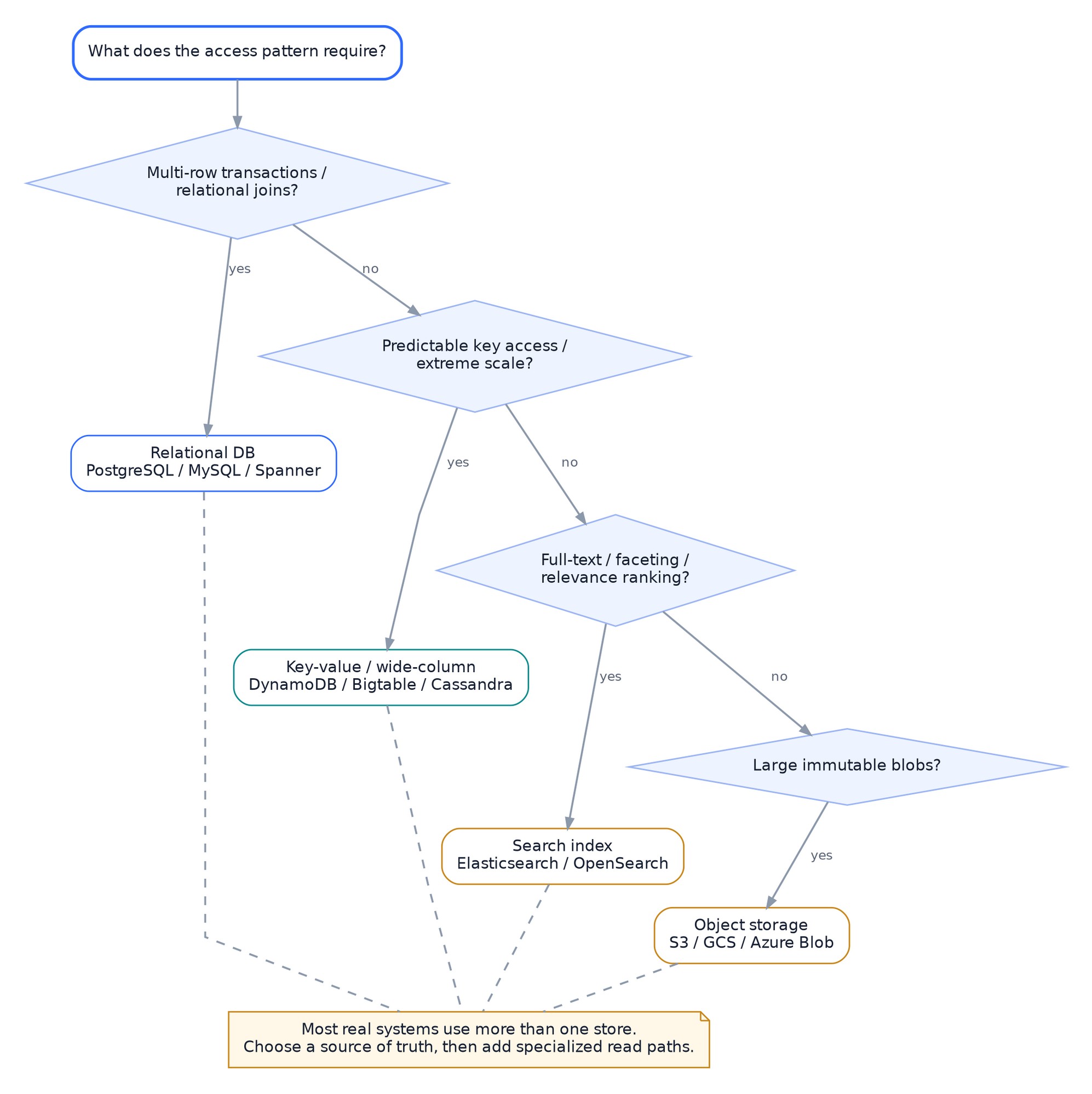
Decision map for choosing a primary data system from transactions, key access, search, and large-object requirements.
6.1 Relational databases
Use a relational database when you benefit from:
- Transactions across related records.
- Constraints and referential integrity.
- Flexible indexed queries.
- Mature SQL tooling.
- Strong consistency as the default mental model.
Common choices include PostgreSQL and MySQL. Distributed SQL systems such as Spanner and CockroachDB extend relational semantics across larger failure domains, with different latency and operational tradeoffs.
Example: an order service with customers, orders, line items, payment status, and uniqueness constraints is a natural relational workload.
Watch for: unbounded table growth, missing indexes, long transactions, contention, connection exhaustion, and a single primary becoming the write bottleneck.
6.2 Key-value and wide-column stores
Use these when access is dominated by known keys and high horizontal scale matters more than flexible joins.
Examples include DynamoDB, Bigtable, and Cassandra.
They reward careful key design. The partition key is not an implementation detail. It determines distribution.
Example: storing per-user timeline pages by user_id + time_bucket can support predictable reads and distribute data across users.
Watch for: hot keys, secondary-index limitations, denormalization complexity, and access patterns that were not anticipated when the schema was designed.
6.3 Document stores
Document databases are useful when application records naturally form aggregates with flexible fields and are usually loaded together.
They can reduce object-relational mapping friction, but “schema flexible” does not mean “schema free.” Applications still depend on structure and must evolve it deliberately.
6.4 Search indexes
Use search systems such as Elasticsearch or OpenSearch for:
- Full-text search.
- Tokenization and relevance scoring.
- Faceting.
- Inverted-index queries.
A search index is often a derived read model, not the source of truth.
Example: product data is committed to the transactional store, then an event updates a search index. If the index is rebuilt, the authoritative product records still exist.
6.5 Object storage
Object stores such as S3 or GCS are a strong fit for large immutable or append-oriented objects:
- Images.
- Videos.
- Model artifacts.
- Backups.
- Data lake files.
- Logs and archival data.
Keep metadata in a store optimized for metadata access; keep large bodies in object storage when appropriate.
6.6 Time-series and analytical systems
Operational metrics, observability data, clickstreams, and analytical queries often have very different access patterns from OLTP workloads.
Examples:
- Prometheus for operational time series.
- ClickHouse, BigQuery, or Snowflake for analytical scans.
- Flink for continuous stateful processing before results are stored.
Do not force operational and analytical traffic onto the same database when their resource patterns interfere.
6.7 Vector indexes are specialized indexes, not replacements for normal data models
Modern AI systems may store embeddings for semantic retrieval. That is useful when the query itself is similarity-based.
A vector index does not replace:
- Transactional state.
- Authorization rules.
- Exact filters.
- Audit history.
- Ordinary indexes.
A common architecture keeps authoritative documents in a primary store and maintains embeddings as a derived retrieval path.
7. Partitioning and replication
Once one machine is no longer enough, two concepts appear repeatedly: partition the data and replicate the data.
Partitioning increases capacity. Replication increases redundancy and read options. They solve different problems.
7.1 Partitioning
A partition function maps data to shards. Common strategies:
- Hash by key.
- Range by key or time.
- Directory/lookup-based placement.
- Composite partitioning, such as tenant plus time bucket.
The shard key shapes the system
A good partition key:
- Has enough cardinality.
- Distributes load.
- Keeps common queries local when possible.
- Avoids unbounded hotspots.
- Allows rebalancing as the system grows.
Bad example: partition all IoT events only by current date. Every device writes to the same active partition.
Better example: partition by device_hash + day, then aggregate across partitions for broader queries.
7.2 Hot partitions
A perfectly even number of keys does not guarantee even traffic.
One tenant, celebrity, stock symbol, live sports event, or cache key can dominate a partition.
Mitigations include:
- Salting/sharding a hot logical key.
- Splitting by time bucket.
- Caching reads.
- Moving heavy tenants to isolated cells.
- Adaptive rebalancing.
- Hybrid fanout strategies.
7.3 Replication
Replication copies data across nodes or failure domains.
Common models:
- Leader with followers.
- Multi-leader.
- Leaderless/quorum-based.
- Synchronous replication.
- Asynchronous replication.
Synchronous replication reduces acknowledged data-loss windows but adds latency and couples availability to replicas in the write path. Asynchronous replication improves local write latency and availability but permits lag and possible loss during failover.
7.4 Plan how data will move between partitions
A sharded system needs a story for:
- Adding capacity.
- Moving partitions.
- Repairing replicas.
- Resharding oversized partitions.
- Keeping traffic flowing during movement.
A partitioning scheme that works only when the cluster is static is incomplete.
7.5 Example: chat messages
Suppose messages are read primarily by conversation.
A natural key is conversation_id, which keeps one conversation’s history together and preserves local ordering.
But a single massive public room could become hot. The design may need to split that room by sequence range or time bucket while preserving an ordered logical view.
The lesson is broader: choose keys from access patterns, then test them against worst-case skew.
8. Consistency, transactions, and coordination
Distributed systems become hard when multiple machines must agree on state despite delays and failures.
8.1 Not every feature needs the same consistency
Useful models include:
- Strong/linearizable reads: a completed write is immediately visible according to a single global order.
- Serializable transactions: concurrent transactions behave as if executed in a valid serial order.
- Read-your-writes: a user sees their own successful updates.
- Monotonic reads: once a client has seen version N, it does not later see version N-1.
- Eventual consistency: replicas converge if updates stop.
Product semantics should choose the model.
Example:
- Username uniqueness usually needs strong coordination.
- A view counter can often be eventually consistent.
- A user’s profile edit may only need read-your-writes for that user.
8.2 CAP is a failure-time tradeoff, not a database shopping acronym
During a network partition, a distributed system cannot both guarantee that every request observes one consistent state and guarantee that every request receives a successful response from every partitioned side.
Outside partitions, latency and consistency tradeoffs still exist. Real designs also care about replication lag, quorum latency, leader placement, and failure detection.
Use CAP to ask what happens when communication breaks, not to label a database once and stop thinking.
8.3 Transactions are coordination tools
Transactions are valuable because they make a group of changes atomic from the application’s point of view.
Keep transaction boundaries aligned with invariants.
For example, “decrement inventory and record the reservation” may need one atomic boundary if overselling is unacceptable.
A transaction that spans many services and networks is much harder to operate. Modern designs often keep strong transactions inside one service boundary and coordinate cross-service workflows asynchronously.
8.4 Sagas for multi-step business workflows
A saga models a business transaction as a sequence of local transactions plus compensating actions.
Example travel booking:
- Reserve flight.
- Reserve hotel.
- Charge payment.
- If payment fails, cancel hotel and flight reservations.
A compensation is not always a perfect rollback. Sending an email cannot be unsent. A shipped package may require a return workflow rather than reversal. Design compensations from business semantics.
8.5 Consensus and leader election
Consensus protocols solve a narrower but foundational problem: multiple nodes agreeing on an ordered state despite failures.
You encounter consensus indirectly in systems such as Kubernetes/etcd, distributed databases, lock services, and control planes.
Do not build custom consensus for ordinary application coordination. Prefer proven systems and keep the coordination surface small.
8.6 Clocks are not always in sync
Wall clocks can drift. Messages can be delayed. Two regions can observe events in different orders.
If correctness depends on ordering, use a mechanism with explicit semantics:
- Database sequence/commit order.
- Per-key sequence numbers.
- Logical clocks.
- Consensus-backed metadata.
- Systems designed for globally ordered transactions when the requirement truly demands it.
9. Caching: trade freshness and complexity for latency and capacity
Caching is powerful because many systems repeatedly read the same data.
The core tradeoff is simple:
A cache stores a copy. The moment there are two copies, you have a consistency problem to manage.
9.1 Common cache locations
- Browser/client cache.
- CDN/edge cache.
- Reverse proxy cache.
- Local process cache.
- Distributed cache such as Redis.
- Database buffer cache.
Each location has different invalidation and failure behavior.
9.2 Cache-aside
The application checks the cache first. On a miss, it reads the source of truth and populates the cache.
This is common because it is simple and caches only requested data.
Failure questions:
- What if the cache is down?
- Can the database absorb all misses?
- What TTL is safe?
- How are updates invalidated?
9.3 Write-through and write-behind
Write-through: update the cache as part of the write path before acknowledging completion.
Write-behind: acknowledge earlier and persist later.
Write-behind can improve latency but increases data-loss and ordering complexity. Use it only when the business semantics allow it.
9.4 Cache invalidation strategies
Options include:
- TTL only.
- Explicit delete/update on writes.
- Versioned keys.
- Event-driven invalidation.
- Short-lived stale-while-revalidate behavior.
No strategy is free. Long TTLs improve hit rate but worsen staleness. Aggressive invalidation reduces staleness but creates more coordination.
9.5 Cache stampedes and hot keys
If a popular key expires, thousands of requests may miss at once and overload the database.
Mitigations:
- Request coalescing / single-flight.
- Randomized TTLs.
- Refresh before expiration.
- Stale-while-revalidate.
- Per-key rate limiting.
- Local plus distributed caching layers.
9.6 Example: product catalog
Product details change infrequently compared with reads.
A reasonable design:
client -> CDN for public page -> API -> distributed cache -> product DB
On update:
product DB commit -> ProductUpdated event -> invalidate/update cache + search index
If the search index is delayed, the source of truth remains the product database. The product page can decide whether seconds of staleness are acceptable.
9.7 When not to cache
Do not add a cache simply because the database seems important.
Caching may be a poor fit when:
- The data changes almost every request.
- Strong freshness is mandatory.
- The working set is much larger than affordable cache memory.
- Cache misses would overwhelm the source.
- The extra operational complexity exceeds the latency benefit.
10. Queues, event logs, and asynchronous systems
Asynchronous communication decouples when work is produced from when it is processed.
That helps with burst absorption, independent scaling, failure isolation, and fanout. It also introduces new problems: duplicates, ordering, retries, poison messages, schema evolution, lag, and operational visibility.
10.1 Queue versus event log
A traditional queue emphasizes work distribution: one job is consumed by one worker or worker group.
An event log emphasizes durable ordered streams that multiple independent consumer groups can read.
Examples:
- SQS or RabbitMQ for background jobs.
- Kafka for replayable event streams and multiple consumers.
- Cloud Pub/Sub for managed publish/subscribe.
The boundary is not absolute; many systems support features from both models.
10.2 What message delivery can promise
“At least once” delivery is common in production because it is robust to uncertain acknowledgements.
That means consumers must expect duplicates.
Exactly-once claims are always scoped. Ask: exactly once where? In the broker? In a stream processor’s state? Across the final external side effect? The last one is the difficult part.
10.3 Idempotent consumers
A consumer should be able to process the same event more than once without creating an incorrect duplicate effect.
Patterns:
- Store processed event IDs.
- Use natural uniqueness constraints.
- Use idempotency keys on downstream APIs.
- Upsert deterministic state instead of blindly inserting.
10.4 Ordering is usually per partition/key, not global
Global ordering is expensive and often unnecessary.
For an order stream, route all events for one order_id to the same partition so that OrderCreated, PaymentAuthorized, and OrderCancelled preserve per-order order.
Independent orders can proceed in parallel.
10.5 Dead-letter queues are not garbage cans
A DLQ should answer:
- Why did the message fail?
- How will it be inspected?
- Can it be replayed safely?
- Does replay preserve required ordering?
- Who owns the alert?
A growing DLQ without ownership is silent data loss.
10.6 The transactional outbox pattern
A common failure occurs when an application commits database state, then separately publishes an event. If the process crashes between those actions, the state exists but the event is lost.
The outbox pattern writes both the business state and an outbox record in the same database transaction. A relay or CDC system later publishes the event.
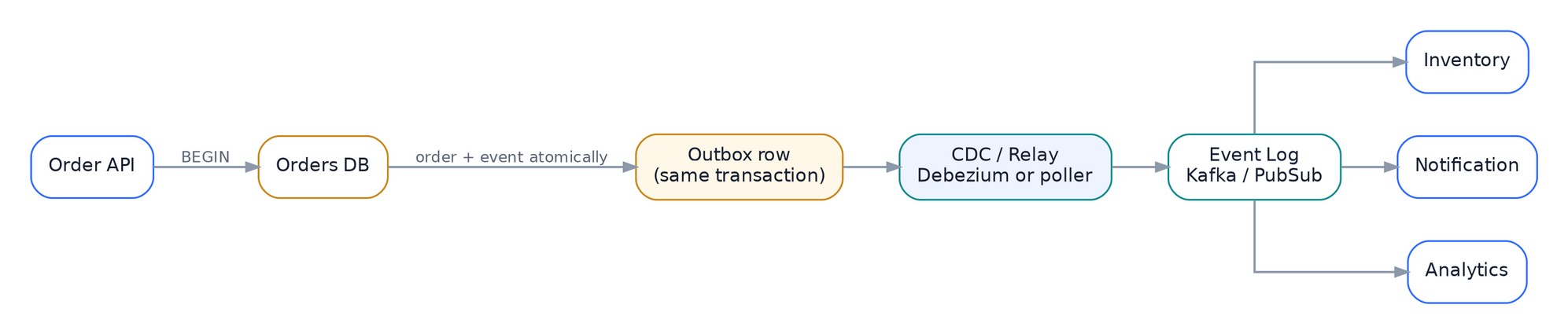
Transactional outbox example for an order service, using an outbox row, CDC or relay, an event log, and downstream consumers.
This converts one hard dual-write problem into a local transaction plus a replayable asynchronous delivery problem.
10.7 Schema evolution
Events live longer than deploys. Consumers may lag behind producers.
Prefer additive, backward-compatible changes when possible. Treat event schemas as APIs.
11. Reliability: decide what happens when things fail
A distributed system should assume that networks delay, dependencies fail, instances restart, disks fill, traffic spikes, and operators deploy bad changes.
Reliability is not one feature. It is a collection of containment mechanisms.
11.1 Timeouts
Every remote call needs a finite deadline.
Without a timeout, a slow dependency can hold threads, connections, memory, and request slots until the caller itself becomes unhealthy.
Choose timeouts from the user’s end-to-end budget and the dependency’s latency distribution. Do not stack arbitrary 30-second defaults through a request path with a 2-second product SLO.
11.2 Retries
Retries help transient failures, but they create extra load exactly when a dependency may be unhealthy.
A safe retry policy asks:
- Is the operation duplicate-safe?
- Is the error likely transient?
- Is there enough deadline left?
- How many attempts are allowed?
- Is backoff randomized?
- Which layer owns the retry?
Three nested layers each doing three attempts can turn one user request into as many as 27 downstream calls.
11.3 Backoff and jitter
Exponential backoff reduces request frequency after repeated failures. Jitter randomizes retry timing so thousands of clients do not synchronize and retry together.
11.4 Idempotency
An idempotent operation can be repeated without creating an unintended additional effect.
For a payment API, the client may send an idempotency key such as checkout-1234-payment. If the first response is lost, the client can retry using the same key and retrieve the original result rather than creating a second charge.

A safe dependency-call pattern using deadlines, bounded retries, backoff and jitter, idempotency, and load shedding.
11.5 Circuit breakers and load shedding
A circuit breaker stops sending normal traffic to a dependency that is clearly failing and can probe for recovery later.
Load shedding rejects low-priority work before saturation takes down all work.
Examples:
- Reject recommendation requests while preserving checkout.
- Return cached search results when live ranking is unavailable.
- Stop expensive background exports when the primary database is under pressure.
Graceful degradation requires knowing what is optional.
11.6 Bulkheads and cells
Bulkheads isolate resources so one failure does not consume everything.
Examples:
- Separate connection pools per dependency.
- Per-tenant concurrency limits.
- Independent worker pools for high and low priority jobs.
- Cell-based architecture where tenants are divided among mostly independent stacks.
Cells reduce blast radius. If one cell fails, only a fraction of tenants are affected.
11.7 Backpressure
When consumers cannot keep up, the system must communicate pressure upstream instead of buffering without bound.
Mechanisms include:
- Bounded queues.
- Flow-control windows.
- Producer throttling.
- Admission control.
- Concurrency limits.
- HTTP 429/503 responses with retry guidance.
Backpressure is how a healthy system says “not now” instead of becoming an unhealthy system that says nothing.
11.8 Keep one failure from spreading
Redundancy helps only when replicas do not fail together.
Think in domains:
- Process.
- Host.
- Rack.
- Zone.
- Region.
- Cloud provider or external dependency.
- Software version.
- Configuration source.
Two replicas in the same failure domain may provide capacity but little resilience.
11.9 Deployment failure is one of the most common failure modes
Plan for:
- Canary releases.
- Progressive traffic shift.
- Feature flags.
- Version compatibility.
- Fast rollback.
- Database migration compatibility.
- Automatic health gates.
A resilient runtime with an unsafe deployment process is still an unreliable system.
12. API and communication choices
Choose a protocol from the interaction pattern, not fashion.
| Pattern | Good fit | Watch for |
|---|---|---|
| REST/HTTP | Public APIs, resource-oriented CRUD, broad interoperability | Over-fetching, weak typing unless schema is enforced |
| gRPC | Internal typed RPC, low overhead, streaming | Browser/proxy support, schema/version discipline |
| GraphQL | Client-driven aggregation across flexible views | Query cost control, caching complexity, N+1 patterns |
| WebSocket | Bidirectional low-latency sessions | Connection state, fanout, reconnect semantics |
| Server-Sent Events | Server-to-client streaming over HTTP | One-way only, proxy buffering |
| Webhooks | Notify another system of events | Retries, signatures, duplicate delivery, endpoint ownership |
| Event stream | Decoupled async fanout and replay | Eventual consistency, schema evolution, lag |
12.1 Propagate deadlines
If an incoming request has 500 ms left, a downstream call should not start with a fresh 5-second timeout. Propagate remaining deadlines so work is cancelled when it can no longer help the user.
12.2 Version contracts deliberately
Compatibility techniques include:
- Additive fields.
- Explicit API versions.
- Consumer-driven contract tests.
- Tolerant readers where appropriate.
- Staged migrations that support old and new clients simultaneously.
The hardest deployments are often not code changes. They are changes to shared contracts.
12.3 Do not expose the internal topology as the API
An API gateway or facade can provide a stable contract while internal services evolve.
This is especially useful when a product surface would otherwise require clients to orchestrate ten internal services themselves.
13. Observability and operability
A design is incomplete until you can answer, during an incident, where time was spent, where errors began, and which users are affected.
13.1 Start with service objectives
A Service Level Indicator (SLI) is a measured behavior such as success rate or latency.
A Service Level Objective (SLO) is the target for that behavior.
Example:
- SLI: percentage of valid checkout requests that complete successfully within 2 seconds.
- SLO: 99.9% over a rolling 28-day window.
An error budget is the tolerated gap between perfect reliability and the objective. It creates a practical way to balance reliability work and release velocity.
13.2 Metrics, logs, traces, and profiles answer different questions
Metrics: Is the system healthy? How fast is it? How much capacity is used?
Logs: What discrete event happened, with what context?
Traces: Where did one distributed request spend time across services?
Profiles: Where is CPU or memory spent inside a process? OpenTelemetry provides a vendor-neutral model for generating and exporting telemetry. Prometheus remains a common operational metrics system with a dimensional time-series model.
13.3 Useful metric frameworks
For request-driven services, RED is a practical starting point:
- Rate of requests.
- Errors.
- Duration.
For resources, USE is useful:
- Utilization.
- Saturation.
- Errors.
Then add domain-specific signals such as queue age, payment declines, cache hit ratio, replication lag, or token throughput.
13.4 Cardinality is a design choice
Labels such as user_id, request_id, or full URL strings can create enormous metric cardinality.
Keep high-cardinality identifiers in traces or logs. Use bounded dimensions in metrics.
13.5 Example: p99 latency suddenly doubles
A useful investigation follows the path:
- Did edge/gateway latency change?
- Did application queue time change?
- Did cache hit ratio fall?
- Did database latency or lock time rise?
- Did a dependency start timing out and trigger retries?
- Did a deployment change request shape?
- Is the problem regional, tenant-specific, or global?
This is why stage-level telemetry is more useful than one end-to-end latency number.
13.6 Plan how you will change the system safely
Design:
- Dashboards around SLOs and bottlenecks.
- Alerts on symptoms and exhaustion trends.
- Runbooks for known failure modes.
- On-call ownership.
- Safe rollback.
- Capacity forecasts.
- Load tests that resemble real traffic.
A system that only its original author can operate is not well designed.
14. Security is an architecture property
Security is not a gateway plugin added at the end.
14.1 Authentication and authorization
Authentication answers who are you?
Authorization answers what are you allowed to do?
Keep authorization near the resource semantics when possible. A gateway can enforce broad policy, but only the owning service may know whether a user can modify a particular account.
14.2 Least privilege and workload identity
Services should receive only the permissions they require, ideally using short-lived workload identity rather than long-lived shared credentials.
14.3 Encrypt data in transit and at rest
TLS should be normal for network communication. Sensitive data at rest should use managed encryption and appropriate key management.
Encryption does not replace access control. If the compromised application has legitimate decrypt permission, encrypted storage alone does not protect the data.
14.4 Multi-tenant isolation
For SaaS systems, ask:
- Can one tenant exhaust shared CPU, connections, queue capacity, or cache memory?
- Are tenant identifiers enforced in every data path?
- Can a query accidentally return another tenant’s data?
- Are logs and metrics safe from cross-tenant leakage?
- Do high-risk tenants require isolated cells or databases?
Per-tenant quotas are both a security and reliability mechanism.
14.5 Abuse is a capacity problem too
Rate limiting, bot controls, request-size limits, authentication throttles, and resource quotas prevent abusive traffic from becoming a reliability incident.
14.6 Threat-model the data flow
For every important path, ask:
- What identities cross this boundary?
- What can the caller control?
- What secrets are present?
- What happens if input is replayed?
- What is logged?
- What privilege does the next service have?
Threat modeling is easier when the request and trust boundaries are already explicit on the architecture diagram.
15. Deployment platforms: choose how you want to run the system
Modern systems have many deployment options. None is automatically “more scalable.”
15.1 Virtual machines
VMs provide strong isolation and direct control. They remain appropriate for stable workloads, specialized networking, legacy software, and cases where container orchestration would not add much value.
15.2 Containers and Kubernetes
Containers standardize packaging. Kubernetes adds declarative scheduling, service discovery, rollout primitives, self-healing, and extensibility for containerized workloads.
Kubernetes is useful when you need a platform for many services and teams, heterogeneous workloads, controlled rollouts, and reusable operational abstractions.
It also has a cost: cluster lifecycle, networking, policy, upgrades, observability, and a large control surface.
Do not use Kubernetes merely because the application has multiple services. A managed platform or serverless service may be simpler.
15.3 Serverless and managed services
Managed compute is attractive when:
- Traffic is bursty.
- Operational overhead should be minimized.
- Work is event-driven.
- Cold-start and runtime constraints are acceptable.
Managed databases, queues, caches, and object stores can remove substantial operational work. The tradeoff is provider coupling, cost model, service limits, and sometimes less control.
15.4 Gateways and service meshes
API gateways usually focus on north-south traffic: authentication, quotas, routing, API policy, and external exposure.
Service meshes focus on east-west service traffic: identity, mTLS, telemetry, traffic policy, retries, load balancing, and failover.
Envoy is a common programmable proxy building block. Istio adds a control plane and service-mesh abstractions around service traffic.
A mesh is valuable when platform-level traffic policy solves repeated organizational problems. It is unnecessary complexity for a small system whose applications can handle their own networking needs.
15.5 Infrastructure as code and progressive delivery
Treat infrastructure and policy changes as reviewed, versioned artifacts.
Useful practices:
- Infrastructure as code.
- Git-based review and audit.
- Progressive rollout.
- Automatic health checks.
- Feature flags.
- Backward-compatible schema migration.
The operational system that changes production is part of the architecture.
16. Multi-region design and disaster recovery
Multi-region architecture is expensive because it duplicates infrastructure and forces explicit decisions about data, routing, and failover.
Do it for a business requirement, not for aesthetic symmetry.
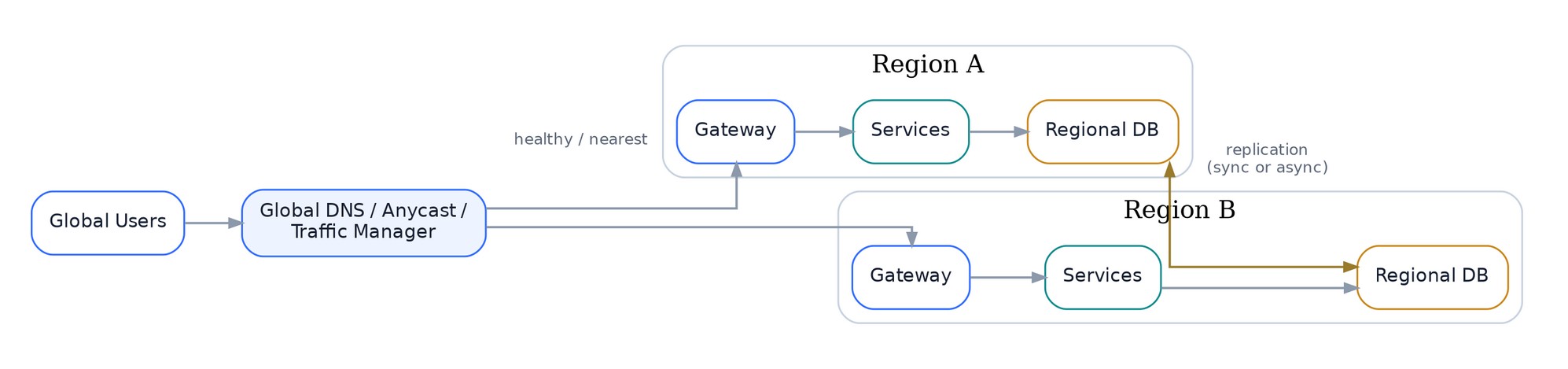
A simplified multi-region architecture with global traffic management, regional gateways and services, regional databases, and an explicit replication path.
16.1 RTO and RPO
Recovery Time Objective (RTO): how long the service may be unavailable. Recovery Point Objective (RPO): how much recently committed data may be lost.
These two numbers shape disaster-recovery architecture more than the phrase “multi-region.”
16.2 Common topologies
Active-passive: one primary region serves traffic; another is prepared for failover.
- Simpler data semantics.
- Recovery can be slower.
- Standby capacity may be underused.
Active-active: multiple regions serve traffic simultaneously.
- Lower user latency and faster regional failover.
- Harder data consistency, conflict, and routing problems.
Cellular/regional partitioning: users or tenants are assigned to home regions/cells; cross-cell dependencies are minimized.
- Smaller blast radius.
- More placement and migration logic.
16.3 Replication choices decide what happens during a failure
If Region A acknowledges a write before Region B receives it, a sudden loss of A can lose recently acknowledged data.
If every write waits for cross-region replication, write latency and partition behavior change.
There is no universal answer. Match replication to the RPO and latency requirement.
16.4 Failover must be tested
A standby region that has never taken production traffic is an assumption, not a recovery plan.
Test:
- DNS/traffic-manager changes.
- Database promotion.
- Secret and configuration availability.
- Queue and event recovery.
- Capacity in the surviving region.
- Client reconnect behavior.
- Failback after the incident.
17. Modern system design considerations
The fundamentals remain stable, but several concerns matter more in today’s systems than they did in simpler three-tier applications.
17.1 Keep one tenant from slowing down another
Cloud systems often share infrastructure among many tenants. Every shared resource becomes a fairness problem:
- CPU.
- Connections.
- queue slots.
- cache capacity.
- storage partitions.
- rate limits.
- background workers.
Add tenant-aware admission control and measure per-tenant resource use before one customer can consume the system.
17.2 Cost is a first-class metric
A system can be technically healthy and economically broken.
Track unit economics such as:
- Cost per 1,000 requests.
- Cost per active user.
- Cost per GB ingested.
- Cost per video minute processed.
- Cost per million model tokens.
Architectural decisions affect cost in non-obvious ways. A cache costs memory but can reduce database and network cost. Multi-region improves resilience but duplicates capacity and data transfer. Aggressive logging can become a material storage bill.
17.3 Data residency and privacy
Global systems increasingly need explicit control over where user data is stored and processed.
Residency can affect:
- Partitioning strategy.
- Backup location.
- Analytics pipelines.
- Model training data.
- Cross-region replication.
- Incident access.
Treat region as a data attribute, not just a deployment choice.
17.4 Real-time versus batch
Not every system needs millisecond updates.
Ask how fresh the result must be.
- Fraud authorization may need sub-second decisions.
- Search indexing may tolerate seconds.
- Daily business reports can often be batch.
The tighter the freshness requirement, the more continuous coordination and operational complexity you buy.
17.5 AI/ML workloads add unusual resource shapes
AI services often differ from ordinary stateless APIs:
- Accelerators are expensive and scarce.
- Request cost can vary by input size.
- Batching improves throughput.
- Model weights consume large, relatively fixed memory.
- Runtime caches can consume dynamic memory.
- Scheduling and placement matter as much as HTTP routing.
- Model and data versions become deployment dimensions.
For LLM inference, useful signals may include queue time, time to first token, tokens/sec, cache usage, prompt length, and GPU utilization rather than only CPU and request latency.
The general system-design lesson still applies: model the resource that actually saturates.
17.6 Edge computing changes locality
Some systems can move filtering, inference, caching, or personalization closer to users. This reduces central traffic and latency but creates versioning, consistency, and observability challenges across more locations.
17.7 Platform engineering can turn repeated architecture into paved roads
When many teams repeatedly need service identity, telemetry, deployment safety, secrets, routing, and policy, a platform can provide these as standardized capabilities.
The danger is building an internal platform whose abstraction is more complicated than the underlying cloud. A good platform removes choices that teams should not need to make and exposes the choices that affect product semantics.
18. Common patterns in modern systems
Patterns are reusable responses to recurring constraints. Use them because the problem matches, not because the name sounds architectural.
| Pattern | Problem it addresses | Example | Main tradeoff |
|---|---|---|---|
| Cache-aside | Repeated expensive reads | Product catalog | Stale copies and invalidation |
| Sharding | One node cannot hold/serve all data | User timelines by user ID | Cross-shard queries, rebalancing |
| Read replicas | Read load exceeds primary capacity | Reporting and product reads | Replication lag |
| CQRS | Read and write models need different shapes | Order writes + denormalized dashboard | More models and eventual consistency |
| Materialized view | Recomputing a read is too expensive | Precomputed feed page | Refresh complexity |
| Transactional outbox | Database + event dual-write gap | OrderCreated event | Extra relay/CDC pipeline |
| CDC | Downstream systems need DB changes | Search indexing | Schema and replay discipline |
| Saga | Business workflow spans services | Booking + payment | Compensation complexity |
| Circuit breaker | Dependency failure is cascading | Recommendation service outage | Tuning and false opens |
| Bulkhead | One workload can exhaust shared resources | Separate tenant pools | Lower pooling efficiency |
| Backpressure | Consumers cannot keep up | Bounded ingestion queue | Producers must handle rejection |
| Rate limiting | Protect finite capacity / enforce fairness | Public API quota | Burst policy and distributed counters |
| Fanout-on-write | Fast reads for many followers | Social feed | Expensive writes for high fanout |
| Fanout-on-read | Avoid huge write fanout | Celebrity feeds | More expensive reads |
| Hybrid fanout | Different users have different fanout | Social feed | More algorithmic complexity |
| Cell-based architecture | Reduce blast radius | SaaS tenants grouped into cells | Placement and duplication |
| Sidecar/mesh | Repeated service networking policy | mTLS, telemetry, traffic control | Data-plane overhead and platform complexity |
| Scatter-gather | Query many partitions in parallel | Search across shards | Tail latency of slow shard |
| Leader election | One actor must perform singleton work | Scheduler/controller | Coordination and failover |
| Event sourcing | State is derived from event history | Audit-heavy domains | Event evolution and rebuild complexity |
18.1 Example: fanout in a social feed
A social feed makes one pattern memorable because the tradeoff is obvious.
If Alice has 500 followers, when she posts you can push the post reference into 500 follower feeds. Reads become cheap. If a celebrity has 100 million followers, pushing 100 million feed updates for one post is expensive and creates hot fanout work.
A practical system may use fanout-on-write for ordinary accounts and fanout-on-read or a hybrid path for very high-fanout accounts.

Hybrid social-feed fanout, with normal posts pushed to per-user feeds and high-fanout authors merged at read time.
The pattern is not “always fanout on write.” The pattern is match precomputation to the distribution of fanout.
19. Worked examples: see the concepts repeat
The best way to retain system design concepts is to watch the same ideas reappear in different products.
19.1 Example 1: URL shortener
Requirements
- Create a short code for a URL.
- Redirect with low latency.
- Redirect traffic is much higher than create traffic.
- Optional expiration and analytics.
First design
client -> edge/LB -> redirect service -> cache -> URL store
Creation path:
client -> API -> ID generator -> URL store
Analytics path:
redirect -> async click event -> stream/warehouse
Key decisions
ID generation:
- Random base62 strings are simple but need collision handling.
- A distributed unique ID can be encoded compactly.
Caching: redirects are read-heavy and often repeat, so popular mappings are excellent cache candidates.
Storage: access is by short code, making a key-value access pattern natural. A relational store can also work comfortably at many scales.
Analytics: do not block redirect latency on analytical writes. Emit events asynchronously.
Failure to think about
If the cache fails, can the backing store absorb the full redirect rate? A cache can become a hidden single point of capacity.
Concepts reused
Read-heavy scaling, cache-aside, key-based storage, asynchronous analytics, capacity planning, graceful cache failure.
19.2 Example 2: social feed
Requirements
- Users create posts.
- Followers see recent relevant posts.
- Feed reads are latency-sensitive.
- Some authors have enormous follower counts.
Architecture sketch
Write path:
Post API -> Post Store -> PostCreated event -> Fanout workers -> Feed Store
Read path:
Feed API -> Feed Cache/Store -> hydrate post/user objects -> response
For high-fanout authors, merge their recent posts into the feed at read time.
Key decisions
Partitioning: feed data naturally partitions by viewer/user ID.
Fanout: ordinary accounts can use fanout-on-write; high-fanout accounts may use a hybrid.
Ranking: ranking can be a separate service or asynchronous model. A ranking outage should not necessarily make the feed unavailable; a chronological fallback may be acceptable.
Consistency: seconds of propagation delay are usually acceptable, enabling asynchronous fanout.
Failure to think about
A replay of a PostCreated event can duplicate feed entries unless fanout updates are idempotent.
Concepts reused
Asynchronous events, partition keys, hot-key handling, idempotency, caching, graceful degradation.
19.3 Example 3: order and payment workflow
Requirements
- Create an order exactly once from a user action.
- Authorize/capture payment safely.
- Reserve inventory.
- Notify fulfillment after committed state.
- Recover from timeouts without duplicate charges.
Architecture sketch
client -> checkout API -> order DB transaction
Within the workflow:
- Create an order with an idempotency key.
- Reserve inventory.
- Call the payment provider using a stable payment idempotency key.
- Persist the final payment/order state.
- Commit an outbox event.
- Publish asynchronously to fulfillment, email, analytics.
For a long-running flow, a durable workflow engine such as Temporal can coordinate retries, timers, and compensations while application services own their local state.
Key decisions
Correctness over availability: if payment outcome is uncertain, return a stable “processing/unknown” state and reconcile instead of issuing a new blind charge.
Outbox: avoid committing the order and then losing the fulfillment event.
Saga: if inventory reserve succeeds but payment permanently fails, release the reservation.
Audit: preserve immutable state transitions for investigation.
Failure to think about
The client times out after the charge succeeds but before receiving the response. The retry must return the original result, not charge again.
Concepts reused
Transactions, idempotency, sagas, outbox, durable workflow, auditability, bounded retries.
19.4 Example 4: live location tracking
Requirements
- Millions of devices send frequent location updates.
- Nearby users need fresh positions.
- Historical analytics are useful but not on the synchronous path.
- Updates are naturally partitionable by device or region.
Architecture sketch
Ingestion:
device -> regional gateway -> ingest service -> stream/log
Processing:
stream -> stateful processor -> latest-location store + geospatial index
History:
stream -> object/analytical storage
Read:
client -> nearby API -> geospatial index/latest state
Key decisions
Partitioning: device ID distributes ingestion; region/geohash helps spatial queries. You may need different write and read models.
Freshness: a late update should not overwrite a newer position. Attach sequence or event timestamps with explicit conflict rules.
Backpressure: if downstream analytics lag, live location serving should continue.
Retention: raw high-frequency history can move to cheaper object storage.
Failure to think about
One city hosts a major event and creates a regional hotspot. Partitioning solely by geography can overload that shard.
Concepts reused
Streaming, stateful processing, CQRS, hot partitions, ordering, backpressure, tiered storage.
19.5 Example 5: LLM inference gateway
Requirements
- Route requests to multiple models or model pools.
- Enforce authentication, quotas, and token limits.
- Keep time to first token and inter-token latency within targets.
- Protect scarce GPU capacity.
- Stream output to clients.
Architecture sketch
client -> API gateway -> admission/routing -> model scheduler -> GPU workers -> token stream
Supporting paths:
- Model registry/configuration.
- Metrics for queue time, prompt/output tokens, GPU memory, and throughput.
- Optional prefix/KV-cache-aware routing.
- Async logging/evaluation path.
Key decisions
Admission control: request count is not enough; a 100,000-token prompt and a 100-token prompt have very different cost.
Scheduling: batching improves GPU throughput, but larger batches can hurt individual latency.
Routing: model availability, tenant policy, adapter placement, and cache locality can all matter.
Backpressure: when GPU queues saturate, reject or queue with explicit limits rather than allowing unbounded wait.
Failure to think about
Autoscaling on CPU will not respond to a GPU scheduler bottleneck. The chosen scaling signal must reflect the constrained resource.
Concepts reused
Admission control, specialized capacity modeling, scheduling, backpressure, streaming, cache locality, SLO decomposition.
20. A practical toolbox: what each system is for
This is not a shopping list. It is a mapping from common problems to commonly used systems.
| Need | Common tools/systems | Use when | Watch for |
|---|---|---|---|
| Relational OLTP | PostgreSQL, MySQL | Transactions, constraints, flexible queries | Primary write bottlenecks, indexing, connection pressure |
| Globally distributed relational data | Spanner, CockroachDB | Strong relational semantics across regions at high scale | Latency, cost, data-model constraints |
| Key-value / wide-column | DynamoDB, Bigtable, Cassandra | Predictable key access and horizontal scale | Partition-key design, hot keys, denormalization |
| Distributed cache | Redis, Valkey | Repeated reads, counters, ephemeral shared state | Staleness, memory cost, stampedes |
| Search | Elasticsearch, OpenSearch | Full-text search, relevance, faceting | Index lag, shard sizing, not source of truth |
| Object storage | S3, GCS, Azure Blob | Large blobs, archives, data lake | Request patterns, lifecycle, egress |
| Event log | Kafka | Replayable ordered streams and many consumers | Partitioning, lag, schema evolution, operations |
| Managed pub/sub | Google Pub/Sub, AWS SNS/SQS combinations | Decoupled async messaging without operating brokers | Delivery semantics, quotas, ordering scope |
| Stateful stream processing | Flink | Continuous event-time/stateful computation | Checkpoints, state growth, operational complexity |
| CDC | Debezium | Publish database row changes to streams | Schema changes, replay, source-log retention |
| Durable workflow | Temporal | Long-running multi-step workflows with retries/timers | Workflow determinism, ownership boundaries |
| Container orchestration | Kubernetes | Many containerized services/workloads and shared platform needs | Control-plane and cluster operational complexity |
| Service proxy | Envoy | Programmable L4/L7 routing, load balancing, resilience | Configuration scale, proxy resource cost |
| Service mesh | Istio | Shared identity, traffic policy, telemetry across many services | Platform complexity, policy ownership |
| Telemetry | OpenTelemetry | Vendor-neutral traces/metrics/log collection | Sampling, cardinality, instrumentation quality |
| Operational metrics | Prometheus | Dimensional service/infrastructure metrics | High-cardinality labels, retention architecture |
| Secrets/keys | Cloud KMS, Vault | Managed key/secrets lifecycle | Permission design and rotation |
| CDN / edge | Cloudflare, Fastly, cloud CDNs | Cacheable/global content and edge controls | Cache key correctness, invalidation, egress |
A simple rule for choosing tools
For every component you add, be able to finish this sentence:
“We need X because requirement Y cannot be met by the simpler design once constraint Z is reached.”
If you cannot, the component may be architecture decoration.
21. A reusable system design worksheet
Use this sequence for a design review, interview, or new project.
Step 1: define the product boundary
- Who are the users/callers?
- What are the top 3-5 flows?
- What is explicitly out of scope?
Step 2: write the guarantees
- Availability target?
- p95/p99 latency target?
- Durability/RPO?
- Recovery/RTO?
- Consistency semantics per key feature?
- Security/compliance/residency constraints?
Step 3: model the workload
- Average and peak QPS?
- Read/write ratio?
- Payload sizes?
- Data growth and retention?
- Concurrency?
- Fanout?
- Skew/hot-key risks?
- Geography?
Step 4: draw one request path
- Edge/gateway.
- Application services.
- Cache/database.
- Synchronous dependencies.
- Queue/event boundaries.
- Response path.
Then mark the latency budget per stage.
Step 5: draw the data path
- Source of truth.
- Partition key.
- Replicas.
- Derived indexes/materialized views.
- Event/CDC flows.
- Backup/archive.
Step 6: design the failure behavior
For every remote dependency:
- Timeout?
- Retry ownership?
- Backoff/jitter?
- Idempotency?
- Circuit breaker?
- Fallback?
- Load shedding?
For every stateful component:
- What if a node dies?
- What if a zone dies?
- What if replication lags?
- What if disk fills?
- What if the cache disappears?
Step 7: design operations
- SLIs/SLOs.
- Metrics/logs/traces.
- Alerts.
- Rollout/rollback.
- Capacity headroom.
- Runbooks.
- Ownership.
Step 8: review cost and complexity
- Biggest cost drivers?
- Unit-cost metric?
- Can a managed service remove toil?
- Can a component be deleted?
- Can a synchronous dependency become asynchronous?
Step 9: identify the first bottleneck
Do not optimize everything. State what you expect to saturate first and how the architecture evolves when it does.
22. Further study: a guided reading map
The best next step is not to read every distributed-systems paper at once. Follow the topic that your current design makes relevant.
22.1 Reliability, SLOs, and operating systems at scale
Google Site Reliability Engineering and Site Reliability Workbook
Start with SLOs, monitoring distributed systems, handling overload, and reliable product launches.
Google Cloud Well-Architected Framework
Useful for reliability, security, performance, cost, and operational design checklists.
AWS Builders’ Library: Timeouts, retries, and backoff with jitter
AWS Builders’ Library: Making retries safe with idempotent APIs
AWS Builders’ Library: Dependency isolation
These are practical references for failure containment and retry behavior.
22.2 Architecture patterns
Azure Architecture Center: Cloud Design Patterns
A broad vendor-agnostic pattern catalog with tradeoffs and examples.
Azure Architecture Center: Architecture Styles
Useful for comparing monolithic, microservice, event-driven, and related styles.
22.3 Relational data and partitioning
PostgreSQL current documentation
Topics worth studying: indexes, transactions, isolation, partitioning, query planning, replication.
22.4 Distributed storage and consistency
A concrete introduction to why partition-key choice determines scalability.
Google Spanner: TrueTime and external consistency
A useful reference for globally ordered transactions and the role of time/coordination.
22.5 Caching
Use the cache-aside guide to connect caching theory to implementation, then study the data types when Redis is used for more than simple strings.
22.6 Event streaming, CDC, and stream processing
Study partitions, consumer groups, replication, delivery, and the design section.
Useful for change data capture, the outbox ecosystem, and database-to-stream pipelines.
Study state, checkpoints, event time, watermarks, and stateful stream processing.
22.7 Durable workflows
Useful when a business process lasts longer than one request and needs durable timers, retries, and recovery across process failures.
22.8 Cloud-native compute and networking
Study workloads, services, storage, cluster architecture, scheduling, and the object/desired-state model.
Useful for modern proxy architecture, service discovery, connection pools, load balancing, circuit breaking, and observability.
Useful for traffic routing, load balancing, failover, timeouts, and service-mesh policy.
22.9 Observability
Study traces, metrics, logs, context propagation, instrumentation, sampling, and semantic conventions.
Prometheus overview and Prometheus data model
Study dimensional metrics, instrumentation, alerting, and cardinality.
22.10 Object storage
Study consistency, request patterns, lifecycle management, performance, versioning, and replication.
Suggested reading order after this guide
If you are starting from scratch:
- Google SRE: SLOs and monitoring.
- AWS Builders’ Library: timeouts/retries/idempotency.
- PostgreSQL: transactions and indexes.
- Redis: cache-aside.
- Kafka: partitions and consumer groups.
- Azure Cloud Design Patterns.
- Kubernetes concepts.
- OpenTelemetry.
- Spanner consistency material when multi-region data becomes relevant.
- Flink/Temporal/Debezium when your system needs those specific execution models.
23. Closing: design from the guarantees and failures backward
Modern systems can contain dozens of services, multiple databases, queues, caches, proxies, regions, and control planes. That complexity can make system design look like a technology-selection exercise.
It is not.
The durable method is simpler:
- Define what the user must experience.
- Quantify the workload.
- Trace the request and data paths.
- Choose storage semantics that match the invariants.
- Identify the bottleneck and scale that resource.
- Assume dependencies will fail and contain the blast radius.
- Instrument the stages that matter to the SLO.
- Make security and recovery properties explicit.
- Measure cost and operational burden.
- Add complexity only when a requirement earns it.
The technologies will change. The reasoning does not.
A good architecture diagram should tell a clear story: what the system promises, where the work goes, where data lives, what happens when a part fails, and which tradeoffs you chose.
That is the core of system design.