Sending a prompt to a large language model looks simple:
POST /v1/responses
A few moments later, text starts appearing.
Behind the API, much more is happening. The request waits in a shared queue, uses GPU memory, and competes with other requests for time on the GPU.
This matters when you run LLM infrastructure. A slow request may come from the gateway, a long queue, a large prompt, a full key-value cache, or slow token generation. Adding more replicas will not fix all of these problems.
Let’s trace a typical text-generation request through a modern LLM serving stack. Specific products use different names and layouts, but the main path is broadly the same:
API gateway → request queue → scheduler → model worker → GPU → KV cache → token stream
1. The API gateway accepts and checks the request
The first part looks familiar to any platform engineer.
A gateway or frontend terminates TLS, authenticates the caller, applies rate limits, and checks the request body. It may also enforce model access, token quotas, tenant limits, and maximum request sizes.
The body usually contains more than the visible user message. A chat application may send system instructions, conversation history, tool definitions, retrieved documents, and output settings such as max_tokens or temperature.
The frontend then converts the request into the serving engine’s internal format. In some deployments, it also chooses a model pool or worker. This routing decision may consider availability, tenant policy, adapter placement, or cache locality.
This is the first useful operational boundary. Gateway latency tells you how long the request spent on HTTP and control-plane work. It does not tell you whether a GPU has started processing the prompt.
2. The text becomes tokens
A model does not directly read strings. A tokenizer converts text into integer IDs called tokens. A token may represent a whole word, part of a word, punctuation, whitespace, or another learned text fragment.
For example, an application may think it sent one short message. The model server sees an ordered array closer to this:
[1, 2047, 338, 263, 7163, 29991, ...]
Tokenization also adds any special markers required by the model’s chat template. The result may include the system message, role separators, earlier messages, and a marker telling the model to begin its answer.
Hugging Face’s tokenizer interface shows the basic conversion: encoding produces input_ids, while decoding converts token IDs back into text. It can also apply truncation, padding, and special tokens during encoding (Hugging Face tokenizer documentation).
This is where prompt length becomes concrete. The scheduler and GPU care about token counts, not character counts. Two strings with similar character lengths can produce different token counts, and every piece of hidden context contributes to the input.
For capacity planning, record the final tokenized prompt length. Logging only the user-visible message size hides the work added by conversation history, retrieval, and tool schemas.
Four terms to know before following the request
The rest of the request path is easier to understand once four closely related terms are separated: prefill, attention, KV cache, and decode.
Imagine sending this prompt:
Explain how Istio ambient mesh handles traffic between two Kubernetes workloads.
The model handles it in two broad phases:
prompt and context
        ↓
prefill: process the existing tokens
        ↓
attention: determine which tokens matter to one another
        ↓
KV cache: retain reusable attention state
        ↓
decode: generate one new token, update the cache, repeat
These terms describe different parts of the same process:
| Term | Plain-language meaning | What it does during a request |
|---|---|---|
| Prefill | Read the existing context | Processes the prompt before the first output token is generated. |
| Attention | Decide what context matters | Lets each token weigh relevant earlier tokens while the model computes its next representation. |
| KV cache | Keep reusable attention state | Stores keys and values for tokens already processed so they do not have to be recomputed at every generation step. |
| Decode | Write the answer incrementally | Predicts one new token, appends its state to the cache, and repeats until a stop condition is reached. |
Prefill and attention are not competing concepts. Prefill is a phase of inference; attention is one of the core computations performed inside that phase. Attention also runs during decode, but then it processes the newest token against the context already represented in the KV cache.
Attention in plain language
Consider the sentence: “The Kubernetes pod sent traffic through the proxy because it was configured incorrectly.” When the model processes “it,” useful context might be “pod” or “proxy,” while words such as “the” carry less meaning for that decision.
Attention learns those relationships with three representations:
- Query (Q): What information is the current token looking for?
- Key (K): What information does each earlier token represent?
- Value (V): What information should be retrieved if that token is relevant?
The query is compared with the keys to produce attention scores. Those scores weight the values, producing a context-aware representation. Real models do this across many attention heads and layers rather than as one simple lookup, but the mental model is useful: compare, weight, combine.
How the KV cache connects prefill to decode
During prefill, the model computes keys and values for every prompt token at every attention layer. If the prompt contains 100,000 tokens, recomputing that state from scratch for every output token would be extremely expensive.
The KV cache retains that state. During decode, the model computes the newest token's query, attends to the cached keys and values, selects a token, and appends the new token's keys and values to the cache. The loop then runs again.
prefill: process prompt → create KV cache
                              ↓
decode step 1: read cache → generate token → append K/V
decode step 2: read cache → generate token → append K/V
decode step 3: read cache → generate token → append K/V
This is why the cache grows with both prompt length and generated output. It is not a database of facts or a long-term memory for the application. It is temporary GPU-side state used to make the current generation practical.
Connect the phases to user-visible latency
Prefill can process many prompt tokens in parallel and is often compute-heavy. Decode is sequential for each request and is often constrained by memory bandwidth because each step repeatedly reads model weights and cache state.
That distinction maps to two useful metrics:
- Time to first token (TTFT): How long the user waits before output begins. Queueing and prefill are major contributors.
- Time per output token (TPOT): How quickly later tokens arrive. Decode scheduling and execution are major contributors.
A long prompt can raise TTFT even when output is short. A long answer can have a reasonable TTFT but still take a long time to finish because decode must advance token by token.
3. The request waits for the scheduler
After tokenization, the request usually joins a queue. A scheduler decides when it can enter a model execution step.
This scheduler exists because a GPU is most efficient when it works on several requests together. A basic server could finish one request before starting the next, but that would waste capacity. Modern engines instead add and remove requests from a running batch as generation proceeds. NVIDIA calls this in-flight batching; it is also commonly called continuous or iteration-level batching (TensorRT-LLM attention documentation).
In simple terms, requests do not need to start or finish together.
Suppose the GPU is generating tokens for requests A, B, and C. If B finishes, the scheduler can insert request D into a later execution step without waiting for A and C to finish.
The scheduler must still respect several limits:
- the maximum number of active sequences
- the token budget for one engine step
- available KV-cache blocks
- model context limits
- request priority or arrival order
- the cost of admitting a long prompt
For example, current vLLM scheduler settings expose limits for scheduled tokens and active sequences, along with first-come-first-served or priority scheduling policies (vLLM scheduler configuration).
Queue time therefore changes with traffic shape, not just request count. Ten requests containing 30,000-token prompts can create very different pressure from ten short chat messages.
4. Prefill processes the complete prompt
Once admitted, the request enters prefill. This is the phase where the model processes the input tokens and builds the state needed to generate an answer.
The Transformer applies its layers across the prompt. Each layer turns token representations into new representations while attention lets each position use relevant earlier positions. The original Transformer design expresses attention using queries, keys, and values derived from those representations (“Attention Is All You Need”).
For serving, the important point is that the prompt tokens can be processed in parallel. A longer prompt creates more work, but the system does not normally run one separate model pass per input token.
Prefill is often compute-heavy. A very long prompt can occupy enough GPU time to delay active requests that are already generating output. Some engines address this with chunked prefill, which divides a large prompt into smaller pieces and schedules them alongside decode work. vLLM documents this as a way to combine compute-heavy prefill operations with memory-heavy decode operations while giving decode requests priority (vLLM optimization guide).
This is one reason time to first token rises with input length. The user cannot receive generated text until the prompt has been processed and the first output token has been selected.
5. The model builds a KV cache
During prefill, every attention layer produces key and value tensors for the prompt. The server stores them in the key-value cache, usually shortened to KV cache.
The purpose is simple: do not recompute the whole prompt every time the model generates another token.
Without this cache, generation would repeatedly process the same context. With it, each decode step can reuse the stored attention state and add entries for the newest token.
KV-cache memory is dynamic. It grows with the number of active requests and the length of each request’s prompt plus generated output. Model weights are comparatively stable once loaded, but KV usage changes continuously.
This makes GPU memory a scheduling resource, not just a deployment prerequisite. NVIDIA’s TensorRT-LLM memory guide lists weights, activation tensors, and I/O tensors as major inference-time consumers, with the KV cache forming the main I/O memory footprint. Its runtime can preallocate a pool of paged KV-cache blocks and distribute those blocks as requests run (TensorRT-LLM memory guide).
Paged allocation solves a practical problem. If every request required one large, contiguous memory region sized for its maximum possible sequence, much of that space would sit unused. PagedAttention instead divides KV memory into blocks, much like virtual-memory pages, so a request can receive more blocks as its sequence grows. The original vLLM paper describes how this approach reduces fragmentation and allows cache blocks to be shared where possible (PagedAttention paper).
When KV capacity runs low, the scheduler may stop admitting requests, preempt work, evict reusable cache entries, or move data to slower memory. The exact behavior depends on the engine. From the client’s point of view, these different causes can all look like higher latency.
The complete request path
At this point, the request has crossed the main control and data boundaries. The following flow shows how those pieces connect in a typical aggregated deployment, where one model worker handles both prefill and decode.
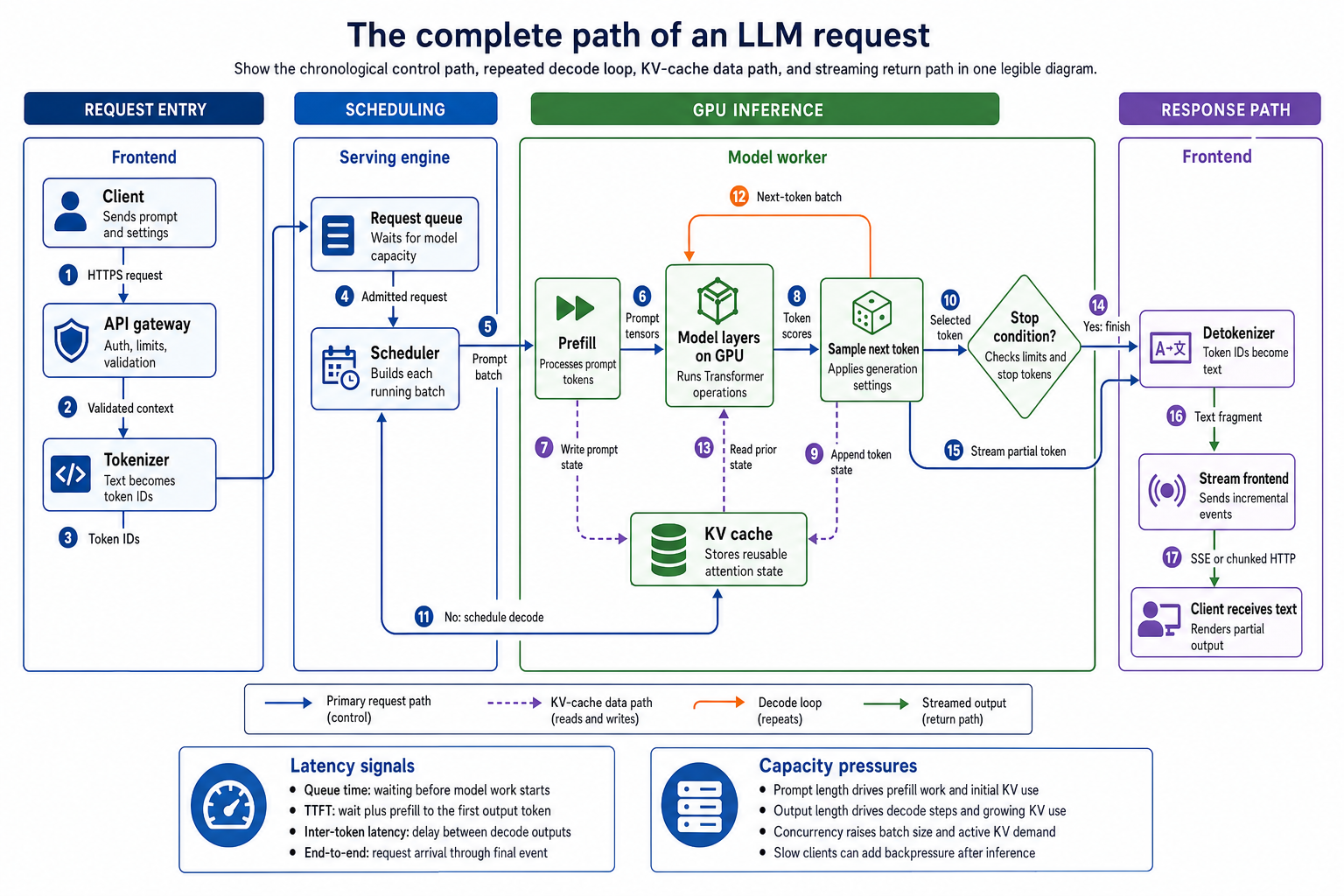
The control path, KV-cache data path, decode loop, and streamed response in a typical aggregated serving stack.
6. Decode generates one token at a time
After prefill, the model has produced scores for the possible next token. The sampling stage applies the request’s generation rules and selects one candidate.
Those rules can include temperature, top-p filtering, stop tokens, repetition controls, or a fixed random seed. Greedy decoding simply chooses the highest-scoring candidate. Other settings allow more variation.
The selected token is appended to the sequence. Its KV entries are added to the cache. The updated sequence then returns to the scheduler for another decode step.
This loop repeats:
schedule → run model → select token → update KV cache → check stop conditions
Unlike prefill, ordinary autoregressive decode is sequential. Token 52 depends on token 51, so the final answer cannot be calculated in one model pass. The scheduler can batch one new token from many active requests, but each individual sequence advances step by step.
That explains an important latency pattern:
- Time to first token is strongly affected by queueing and prefill.
- Time between output tokens is strongly affected by decode scheduling and execution.
- End-to-end latency includes both, plus the requested output length.
vLLM exposes these as separate production metrics, including queue time, time to first token, inter-token latency, and complete request latency (vLLM production metrics). Treating them as one number makes diagnosis much harder.
7. Tokens are decoded and streamed to the client
Token IDs are not useful to the caller, so the server converts them back into text fragments. It may buffer fragments briefly because token boundaries do not always match clean character or word boundaries.
With streaming enabled, the frontend sends incremental events while generation is still running. For example, the OpenAI Responses API emits server-sent events when stream is set to true (OpenAI streaming API reference). Other APIs may use chunked HTTP responses or WebSockets, but the basic idea is the same.
Streaming improves perceived responsiveness, not model execution speed. The full generation still takes roughly the same amount of inference work. The client simply receives completed pieces earlier.
Streaming also introduces backpressure. If the client reads slowly or a proxy buffers the response, generated data may wait in host memory or network buffers. Your GPU metrics can look healthy while users report uneven output.
Check the complete path when debugging stream quality:
model worker → serving frontend → ingress or load balancer → client SDK → UI
A proxy that buffers server-sent events can turn smooth token production into visible bursts.
The main tradeoffs hidden behind one API call
The serving system is continually balancing latency, throughput, and memory.
A larger batch can improve total token throughput because more requests share each GPU step. It can also increase the time an individual request waits or the interval between its tokens.
Long prompts increase prefill work and KV-cache use. Long outputs keep KV blocks allocated and consume repeated decode steps. High concurrency multiplies the active cache footprint.
Prefix caching can avoid repeating prefill work when requests share an exact reusable prefix. Speculative decoding can propose several tokens with a smaller model and verify them with the main model. Quantization can reduce the memory used by weights or cache data. Each optimization changes a different part of the path; none is a universal speed switch.
Larger systems may also separate prefill and decode into different worker pools. The prefill worker processes the prompt and creates the KV cache, then transfers that state to a decode worker. This allows the two phases to scale independently, but KV transfer becomes a new data path that must be measured and operated. NVIDIA’s Dynamo documentation describes this three-step flow and notes that disaggregation is not automatically better for short prompts, small models, low concurrency, or systems without a fast transfer path (NVIDIA Dynamo disaggregated serving).
Start with an aggregated worker unless measurements show that prefill and decode need different scaling or hardware shapes. More components create more places for queueing, transfer delays, and partial failure.
Instrument the request as a pipeline, not a black box
The practical next step is to split request latency into stages.
At minimum, collect these values per request or as distributions grouped by model and workload class:
- Gateway time — authentication, validation, routing, and admission controls.
- Token counts — final prompt tokens and generated tokens.
- Queue time — time waiting for the model scheduler.
- Time to first token — queueing and prompt work before output begins.
- Inter-token latency — how smoothly decode advances.
- End-to-end latency — total time until completion.
- Active and waiting requests — current scheduler pressure.
- KV-cache use — allocated blocks, free capacity, evictions, and preemptions.
- Stream delivery time — delay between generation and client receipt.
Then test with realistic combinations of input length, output length, concurrency, and arrival rate. A benchmark made only of identical short prompts will not show how the service behaves when a retrieval request arrives beside dozens of active chat generations.
This model also makes incidents easier to classify. High queue time points toward admission or capacity pressure. Normal queue time with high time to first token points toward prompt processing. Good time to first token with poor inter-token latency points toward decode contention. Healthy inference metrics with bursty client output points toward the streaming path.
An LLM endpoint is more than an HTTP service connected to a GPU. It is a scheduler that manages GPU time and memory. It processes prompts in parallel, then generates tokens one at a time. Measure these steps separately and the system becomes much easier to understand and operate.
Sources
- Hugging Face, Fast tokenizers
- Vaswani et al., Attention Is All You Need
- NVIDIA TensorRT-LLM, GPT attention and in-flight batching
- vLLM, Scheduler configuration
- vLLM, Optimization and tuning
- NVIDIA TensorRT-LLM, Memory usage and KV-cache allocation
- Kwon et al., Efficient Memory Management for Large Language Model Serving with PagedAttention
- vLLM, Production metrics
- OpenAI, Responses API streaming events
- NVIDIA Dynamo, Disaggregated serving